
Jason Kolpin Random Docs and Howto's
Setting Up Geoip For IPTables To Block Entire Countries (Debian Bookworm)
WARNING!!! THIS REQUIRES YOU TO COMPILE A KERNEL MODULE. THIS MEANS EVERY TIME YOU UPGRADE YOUR KERNEL YOU WILL NEED TO INSTALL THE CORRESPONDING HEADERS AND REBUILD THE MODULES.
Install required packages
:~# apt-get install xtables-addons-dev xtables-addons-common libtext-csv-xs-perl pkg-config build-essential libnet-cidr-lite-perl
Install the PROPER kernel headers for YOUR kernel.
Check your kernel version
:~# uname -a
Linux SRIT2 6.1.0-30-amd64 #1 SMP PREEMPT_DYNAMIC Debian 6.1.124-1 (2025-01-12) x86_64 GNU/Linux
Search for the kernel packages
:~# apt search 6.1.0-30-amd64

Sorting... Done
Full Text Search... Done
linux-headers-6.1.0-30-amd64/stable-updates,stable-updates,now 6.1.124-1 amd64 [installed]
  Header files for Linux 6.1.0-30-amd64

linux-image-6.1.0-30-amd64/stable-updates,stable-updates,now 6.1.124-1 amd64 [installed,automatic]
  Linux 6.1 for 64-bit PCs (signed)

linux-image-6.1.0-30-amd64-dbg/stable-updates,stable-updates 6.1.124-1 amd64
  Debug symbols for linux-image-6.1.0-30-amd64

linux-image-6.1.0-30-amd64-unsigned/stable-updates,stable-updates 6.1.124-1 amd64
  Linux 6.1 for 64-bit PCs
Showing the headers package for my current kernel here
:~# apt install linux-headers-6.1.0-30-amd64
Install the xtables addons package. BE SURE the kernel module builds properly
:~# apt install xtables-addons-dkms
:~# cd /opt
Download the geoip data:
:~# /usr/libexec/xtables-addons/xt_geoip_dl
Check if the xt_geoip db directory exists.
:~# ls -lsa /usr/share|grep xt_geoip
If that directory DOES EXIST, be sure to look in it to see what files are there. If there are files there, xt_geoip may already be installed or there was an earlier failed attempt possibly.
If the directory doesn't exist, create it, and build the geoip db to it.
:~# mkdir /usr/share/xt_geoip

:~# chmod 755 /usr/share/xt_geoip

:~# /usr/libexec/xtables-addons/xt_geoip_build -D /usr/share/xt_geoip *.csv
Add xt_geoip to /etc/modules
# /etc/modules: kernel modules to load at boot time.
#
# This file contains the names of kernel modules that should be loaded
# at boot time, one per line. Lines beginning with "#" are ignored.
# Parameters can be specified after the module name.
xt_geoip
REBOOT and log back in.
Check to be sure the geoip module is loaded.
:~# lsmod |grep geoip

xt_geoip               16384  1
x_tables               61440  11 xt_dscp,xt_conntrack,iptable_filter,xt_LOG,xt_multiport,xt_tcpudp,xt_geoip,ipt_REJECT,ip_tables,iptable_nat,iptable_mangle
Add TEST LOGGING RULE Via Webmin
Do not block anything yet! Just log so we can test it without locking ourselves out. Add your contry code to the iptables rule. So if I live in the United States, the country code is "US". Change --dst-cc to US like the following image
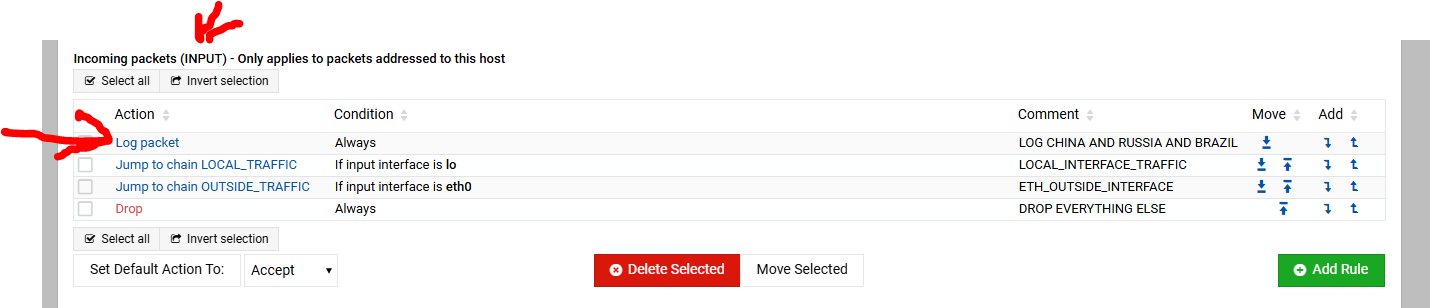
Click for larger image
Return to main IPTables page in Webmin and apply the rules and then refresh the Webmin page.
Check the journal log in Webmin or terminal (journalctl -xe) for firewall reports. It should show your ip address in the log somewhere looking like the example below.
:~# journalctl -xe

Feb 03 15:51:44 [REDACTED!] kernel: IN=eth0 OUT= MAC=[REDACTED!] SRC=[YOURIPADDRESSSHOULDBEHERE] DST=[REDACTED!] LEN=40 TOS=0x00 PREC=0x00 TTL=111 ID=175 DF PROTO=TCP SPT=6567 DPT=10000 WINDOW=1024 RES=0x00 ACK URGP=0