
Jason Kolpin Random Docs and Howto's
RTL-SDR OP25 Install Guide For Raspberry PI OS Bookworm
Install Raspberry PI OS minimal install 64bit to SD card.
:~# sudo apt update
:~# sudo apt install git rtl-sdr
Need to set up a udev rule for rtl-sdr:
:~# sudo nano /etc/udev/rules.d/20.rtlsdr.rules
Paste the following into nano:
SUBSYSTEM=="usb", ATTRS{idVendor}=="0bda", ATTRS{idProduct}=="2838", GROUP="adm", MODE="0666", SYMLINK+="rtl_sdr"
Press ctrl+o to save and then ctrl+x to exit nano.
We have to pin the debian version of ffmpeg as the Raspberry PI version is broken with liquidsoap.
:~# sudo nano /etc/apt/preferences.d/ffmpeg.pref
Paste the following into nano:
Package: ffmpeg libavcodec-dev libavcodec59 libavdevice59 libavfilter8 libavformat-dev libavformat59 libavutil-dev libavutil57 libpostproc56 libswresample-dev libswresample4 libswscale-dev libswscale6
Pin: origin deb.debian.org
Pin-Priority: 1001
Press ctrl+o to save and then ctrl+x to exit nano. Then update apt sources:
:~# sudo apt update
:~# sudo apt upgrade
During the upgrade dkms-xtrx fails to compile. We can just loose it for now:
:~# sudo apt remove dkms-xtrx
Once successful and everything seems to have went okay, now would be a good time to reboot
:~# sudo init 6
Next we get OP25 using git:
:~# git clone https://github.com/boatbod/op25.git
:~# cd op25
:~# ./install.sh
Installation takes a while but you need to watch so you can press enter (enter defaults to yes) when asked about installing debian packages.
Install icecast2 and liquidsoap:
:~# sudo apt install icecast2 liquisoap
When icecast2 is setting up it will ask if you want to change the passwords. Choose yes and set the passwords. As long as this is only running on your LAN and not being forwarded to the internet, I suggest using the same simple password for all of them.
:~# nano /etc/icecast2/icecast.xml
My icecast.xml:
<icecast>
    <location>Earth</location>
    <admin>icemaster@localhost</admin>

    <limits>
        <clients>100</clients>
        <sources>2</sources>
        <queue-size>524288</queue-size>
        <client-timeout>30</client-timeout>
        <header-timeout>15</header-timeout>
        <source-timeout>10</source-timeout>
        <burst-on-connect>0</burst-on-connect>
        <burst-size>0</burst-size>
    </limits>

    <authentication>

        <source-password>mynewpassword</source-password>

        <relay-password>mynewpassword</relay-password>

        <admin-user>admin</admin-user>
        <admin-password>mynewpassword</admin-password>
    </authentication>

    <hostname>piserv1</hostname>

    <listen-socket>
        <port>8000</port>
        <!-- <bind-address>127.0.0.1</bind-address> -->
        <!-- <shoutcast-mount>/stream</shoutcast-mount> -->
    </listen-socket>

    <http-headers>
        <header name="Access-Control-Allow-Origin" value="*" />
    </http-headers>

    <fileserve>1</fileserve>

    <paths>
        <basedir>/usr/share/icecast2</basedir>
        <logdir>/var/log/icecast2</logdir>
        <webroot>/usr/share/icecast2/web</webroot>
        <adminroot>/usr/share/icecast2/admin</adminroot>
        <alias source="/" destination="/status.xsl"/>
    </paths>

    <logging>
        <accesslog>access.log</accesslog>
        <errorlog>error.log</errorlog>
        <loglevel>3</loglevel> <!-- 4 Debug, 3 Info, 2 Warn, 1 Error -->
        <logsize>10000</logsize> <!-- Max size of a logfile -->
    </logging>

    <security>
        <chroot>0</chroot>
    </security>
</icecast>
Restart icecast2:
:~# sudo systemctl restart icecast2
Check the icecast2 status:
:~# sudo systemctl status icecast2
Time to set up the op25 stuff. First we need a little information from radio-reference.com. CHoose your state on the map and on the next page, choose your county.
In the entities list to the right of the map look for a link that says yadda yadda "trunked systems". Here is a link to where mine goes Silver Bow County, Montana. As you can see, there is only one link in this list. Click that link.
Now you will be presented with a list of sites and frequencies. Search the county column for your county. There will more than likely be multiple so it will be up to you to test and figure out which you want to use. In my case, I will be looking for Silver Bow County and I know the trunk I want to use is "Butte Uptown". By clicking this link you can view th site details. Scrolling down, you can see the site frequencies. In the case you want the two red ones, 851.350c 851.625c Finding the frequencies you need will be left up to you.
Now that we have our frequencies, lets check and see if op25 is working:
:~# cd ~/op25/op25/gr-op25_repeater/apps
Run a simple command to see if we get anything. Pay attention to how -f is defined using one of our "c" frequencies. SOem frequencies have 4 digits after the decimal point. No matter what the frequency length is, always follow it up with "e6":
:~# ./rx.py --args 'rtl' -N 'LNA:47' -S 2500000 -x 2 -f 851.350e6 -o 17e3 -q 0
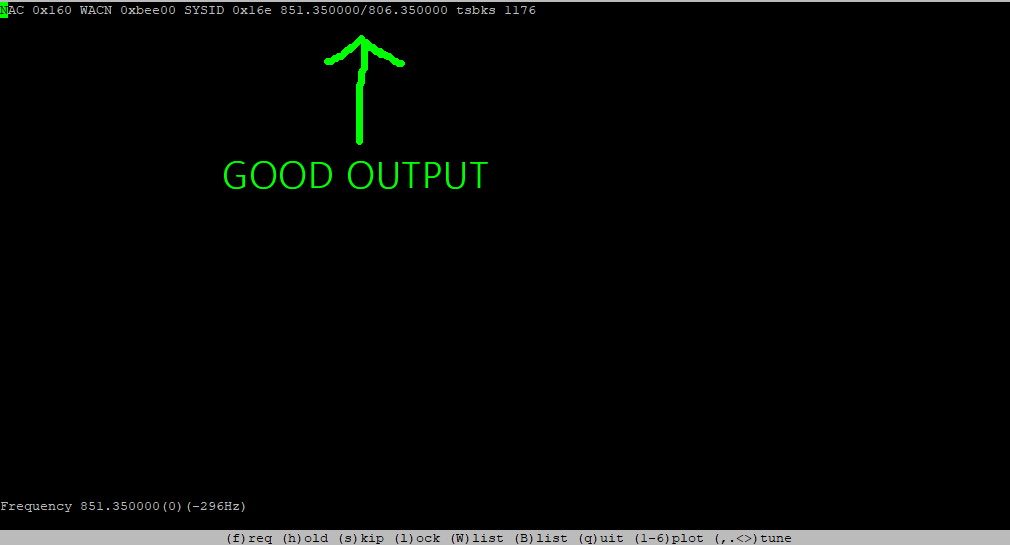
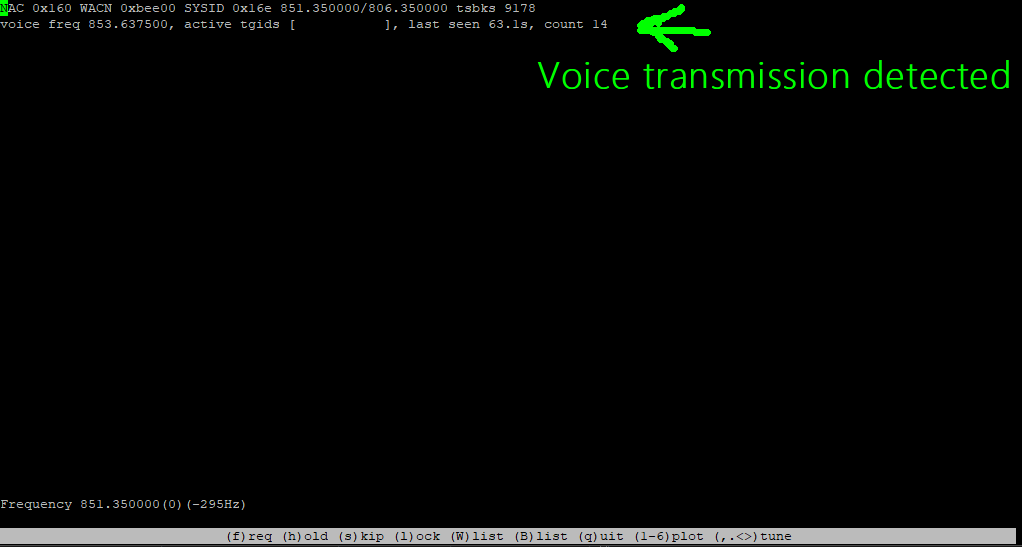
You should get some form of output at this point and should look like this:
Click for larger image
Click for larger image
If your output is all zeros, command adjustments should be made
From good output, we need to get the NAC. In this case it is 0x160.
TSV explanation: A .tsv files is a TAB SEPARATED VALUES file. The first line is quoted and tab separated column headers. The next lines are trunk data entered one line per trunk.
"Sysname"	"Control Channel List"	"Offset"	"NAC"	"Modulation"	"TGID Tags File"	"Whitelist"	"Blacklist"	"Center Frequency"
"UPTOWNBUTTE"	"851.35"	"0"	"0x160"	"cqpsk"	"mytgids.tsv"	""	""	""
Contents of mytgids.tsv:
227	Highway Patrol District 3 Butte 1
229	Highway Patrol District 3 Butte 2
827	Highway Patrol District 3 Butte 3
829	Highway Patrol District 3 Butte 4
10397	Law Dispatch
10403	Fire Dispatch
10405	Fire-Tac
283	JeffersonCo Sheriff Dispatch
284	JeffersonCo Sheriff Ops
9229	National Guard Air Ops 1
9231	National Guard Air Ops 2
9233	National Guard Air Ops 3
9235	National Guard Air Ops 4
9237	National Guard Air Ops 5
9239	National Guard Air Ops 6
9241	National Guard Air Ops 7
9243	National Guard Air Ops 8
9245	National Guard Air Ops 9
5033	NW Montana Drug Task Force
1595	Montana State Prison Main Ch 1
1597	Montana State Prison Secondary Ch 2
1619	Montana State Prison Incident 1
175	Interoperability 1
177	Interoperability 2
179	Interoperability 3
181	Statewide Incident Command 4
183	Statewide Incident Command 5
1739	MT FWP Reg 3 Adm
1737	MT FWP Reg 3 Ops